Overview
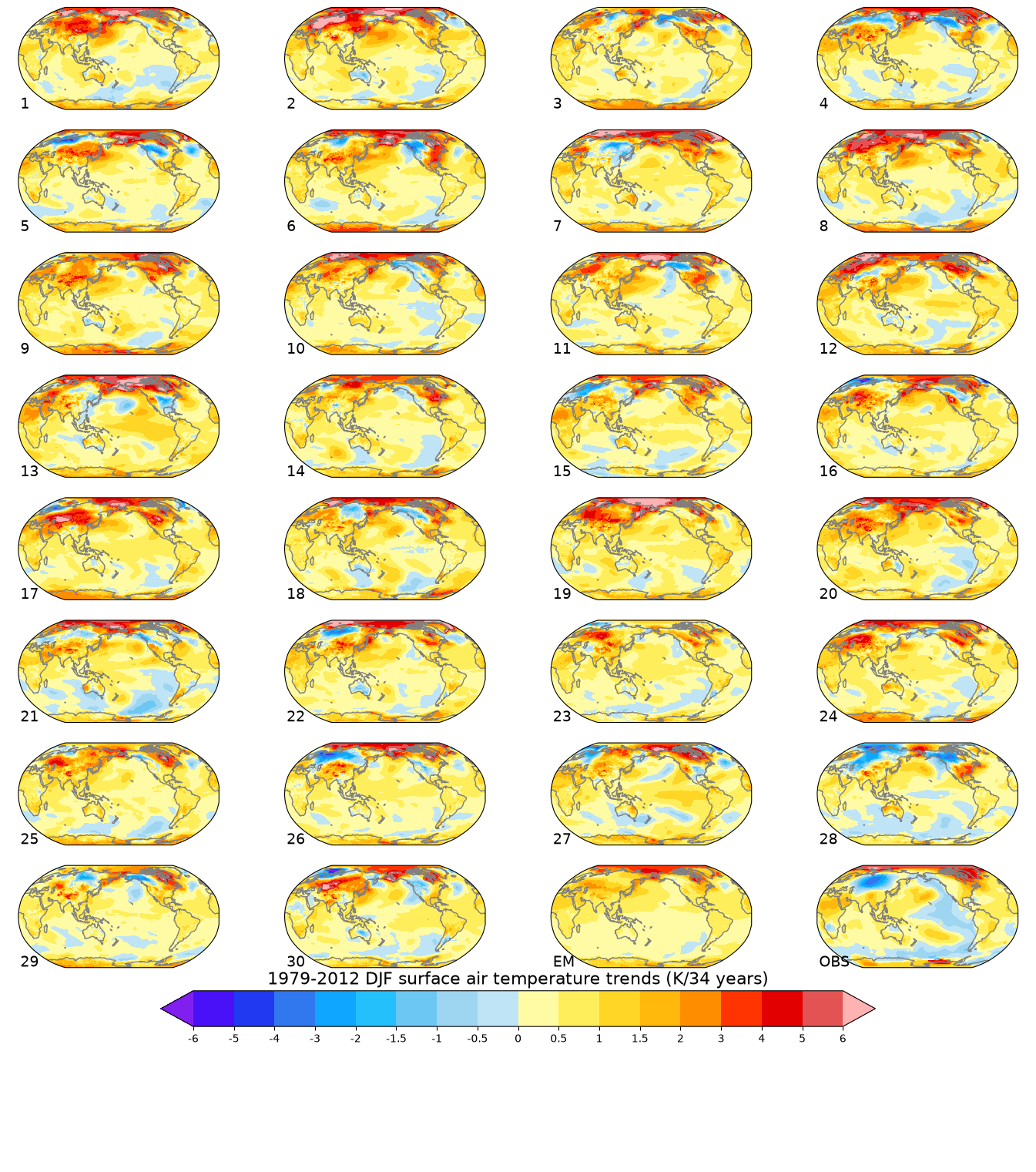
This notebook demonstrates how one might use the NCAR Community Earth System Model (CESM) Large Ensemble (LENS) data hosted on AWS S3. The notebook shows how to reproduce figures 2 and 4 from the Kay et al. (2015) paper describing the CESM LENS dataset Kay et al., 2015.
This resource is intended to be helpful for people not familiar with elements of the Pangeo framework including Jupyter Notebooks, Xarray, and Zarr data format, or with the original paper, so it includes additional explanation.
Imports
import sys
import intake
import matplotlib.pyplot as plt
from dask.distributed import Client
import numpy as np
import pandas as pd
import xarray as xr
import cmaps  # for NCL colormaps
import cartopy.crs as ccrs
import dask
dask.config.set({"distributed.scheduler.worker-saturation": 1.0})<dask.config.set at 0x7f8093592c10>Create and Connect to Dask Distributed Cluster
Here we’ll use a dask cluster to parallelize our analysis.
platform = sys.platform

if (platform == 'win32'):
    import multiprocessing.popen_spawn_win32
else:
    import multiprocessing.popen_spawn_posix
client = Client()
clientLoad and Prepare Data
catalog_url = 'https://ncar-cesm-lens.s3-us-west-2.amazonaws.com/catalogs/aws-cesm1-le.json'
col = intake.open_esm_datastore(catalog_url)
colShow the first few lines of the catalog:
col.df.head(10)Show expanded version of collection structure with details:
col.keys_info().head()Extract data needed to construct Figure 2
Search the catalog to find the desired data, in this case the reference height temperature of the atmosphere, at monthly time resolution, for the Historical, 20th Century, and RCP8.5 (IPCC Representative Concentration Pathway 8.5) experiments. Monthly resolution is sufficient here since Figures 2 and 4 only ever use annual or seasonal means, and using it instead of daily data cuts the volume read from S3 by roughly a factor of 30.
col_subset = col.search(frequency="monthly", component="atm", variable="TREFHT",
                        experiment=["20C", "RCP85", "HIST"])

col_subsetcol_subset.dfLoad catalog entries for subset into a dictionary of Xarray Datasets:
dsets = col_subset.to_dataset_dict(xarray_open_kwargs={"consolidated": True}, storage_options={"anon": True})
print(f"\nDataset dictionary keys:\n {dsets.keys()}")
--> The keys in the returned dictionary of datasets are constructed as follows:
	'component.experiment.frequency'
Dataset dictionary keys:
 dict_keys(['atm.HIST.monthly', 'atm.20C.monthly', 'atm.RCP85.monthly'])
Define Xarray Datasets corresponding to the three experiments:
ds_HIST = dsets['atm.HIST.monthly']
ds_20C = dsets['atm.20C.monthly']
ds_RCP85 = dsets['atm.RCP85.monthly']
Use the dask.distributed utility function to display size of each dataset:
from dask.utils import format_bytes
print(f"Historical: {format_bytes(ds_HIST.nbytes)}\n"
      f"20th Century: {format_bytes(ds_20C.nbytes)}\n"
      f"RCP8.5: {format_bytes(ds_RCP85.nbytes)}")
Historical: 177.21 MiB
20th Century: 8.50 GiB
RCP8.5: 9.39 GiB
Now, extract the Reference Height Temperature data variable:
t_hist = ds_HIST["TREFHT"]
t_20c = ds_20C["TREFHT"]
t_rcp = ds_RCP85["TREFHT"]
t_20cThe global surface temperature anomaly is computed relative to the 1961-90 base period in the Kay et al. paper. Rather than extracting that time slice up front, we’ll derive its mean later directly from the full 20th Century series once it’s loaded, which avoids reading those same years from S3 twice.
Figure 2
Read grid cell areas
Cell size varies with latitude, so this must be accounted for when computing the global mean.
cat = col.search(frequency="static", component="atm", experiment=["20C"])
_, grid = cat.to_dataset_dict(aggregate=False, storage_options={'anon':True}, xarray_open_kwargs={"consolidated": True}).popitem()
grid
--> The keys in the returned dictionary of datasets are constructed as follows:
	'variable.long_name.component.experiment.frequency.vertical_levels.spatial_domain.units.start_time.end_time.path'
cell_area = grid.area.load()
total_area = cell_area.sum()
cell_areaDefine weighted means
Note: resample(time="YS") does an annual resampling based on start of calendar year. See documentation for Pandas resampling options.
t_hist_ts = (
    (t_hist.resample(time="YS").mean("time") * cell_area).sum(dim=("lat", "lon"))
) / total_area

t_20c_ts = (
    (t_20c.resample(time="YS").mean("time") * cell_area).sum(dim=("lat", "lon"))
) / total_area

t_rcp_ts = (
    (t_rcp.resample(time="YS").mean("time") * cell_area).sum(dim=("lat", "lon"))
) / total_area
Read data and compute means
Dask’s “lazy execution” philosophy means that until this point we have not actually read the bulk of the data. Steps 1 and 4 take a while to complete, so we include the Notebook “cell magic” directive %%time to display elapsed and CPU times after computation. The reference-period mean needed for the anomaly calculation is derived directly from the Step 1 result, so it doesn’t require an extra read of the data.
Step 1 (takes a while): load the full 20th Century series
%%time
# this cell takes a while, be patient
t_20c_ts = t_20c_ts.load()
t_20c_ts_df = t_20c_ts.to_series().unstack().T
t_20c_ts_df.head()
CPU times: user 12.6 s, sys: 942 ms, total: 13.5 s
Wall time: 39.5 s
Step 2 (executes quickly): Compute the 1961-90 reference-period mean from the full time series
Derive the 1961-90 reference-period mean directly from the 20th Century series we just loaded, rather than re-reading those same years from S3 a second time:
%%time
t_ref_mean = t_20c_ts.sel(time=slice("1961", "1990")).mean(dim=("time", "member_id"))
t_ref_mean
CPU times: user 71 μs, sys: 1.94 ms, total: 2.01 ms
Wall time: 1.85 ms
Step 3 (executes quickly): convert pre-loaded historical data to a pandas series
%%time
t_hist_ts_df = t_hist_ts.to_series().T
t_hist_ts_df.head()
CPU times: user 363 ms, sys: 46.3 ms, total: 409 ms
Wall time: 1.36 s
time
1850-01-01 00:00:00    286.205444
1851-01-01 00:00:00    286.273590
1852-01-01 00:00:00    286.247986
1853-01-01 00:00:00    286.240692
1854-01-01 00:00:00    286.150696
dtype: float32
Step 4 (takes a while): Do the same thing for the RCP8.5 scenario data
%%time
t_rcp_ts_df = t_rcp_ts.to_series().unstack().T
t_rcp_ts_df.head()
CPU times: user 13.8 s, sys: 925 ms, total: 14.7 s
Wall time: 42.3 s
Get observations for Figure 2 (HadCRUT4)
The HadCRUT4 temperature dataset is described by Morice et al. (2012).
Observational time series data for comparison with ensemble average:
obsDataURL = "https://www.esrl.noaa.gov/psd/thredds/dodsC/Datasets/cru/hadcrut4/air.mon.anom.median.nc"
ds = xr.open_dataset(obsDataURL).load()
dsdef weighted_temporal_mean(ds):
"""
weight by days in each month
"""
time_bound_diff = ds.time_bnds.diff(dim="nbnds")[:, 0]
wgts = time_bound_diff.groupby("time.year") / time_bound_diff.groupby(
"time.year"
).sum(...)
obs = ds["air"]
cond = obs.isnull()
ones = xr.where(cond, 0.0, 1.0)
obs_sum = (obs * wgts).resample(time="YS").sum(dim="time")
ones_out = (ones * wgts).resample(time="YS").sum(dim="time")
obs_s = (obs_sum / ones_out).mean(("lat", "lon")).to_series()
return obs_sLimit observations to 20th century:
obs_s = weighted_temporal_mean(ds)
obs_s = obs_s['1920':]
obs_s.head()
time
1920-01-01 -0.262006
1921-01-01 -0.195891
1922-01-01 -0.301986
1923-01-01 -0.269062
1924-01-01 -0.292857
Freq: YS-JAN, dtype: float64all_ts_anom = pd.concat([t_20c_ts_df, t_rcp_ts_df]) - t_ref_mean.data
years = [val.year for val in all_ts_anom.index]
obs_years = [val.year for val in obs_s.index]Combine ensemble member 1 data from historical and 20th century experiments:
hist_anom = t_hist_ts_df - t_ref_mean.data
member1 = pd.concat([hist_anom.iloc[:-2], all_ts_anom.iloc[:,0]], verify_integrity=True)
member1_years = [val.year for val in member1.index]
Plotting Figure 2
Global surface temperature anomaly (1961-90 base period) for individual ensemble members, and observations:
ax = plt.axes()

ax.tick_params(right=True, top=True, direction="out", length=6, width=2, grid_alpha=0.5)
ax.plot(years, all_ts_anom.iloc[:,1:], color="grey")
ax.plot(obs_years, obs_s['1920':], color="red")
ax.plot(member1_years, member1, color="black")


ax.text(
    0.35,
    0.4,
    "observations",
    verticalalignment="bottom",
    horizontalalignment="left",
    transform=ax.transAxes,
    color="red",
    fontsize=10,
)
ax.text(
    0.35,
    0.33,
    "members 2-40",
    verticalalignment="bottom",
    horizontalalignment="left",
    transform=ax.transAxes,
    color="grey",
    fontsize=10,
)
ax.text(
    0.05,
    0.2,
    "member 1",
    verticalalignment="bottom",
    horizontalalignment="left",
    transform=ax.transAxes,
    color="black",
    fontsize=10,
)

ax.set_xticks([1850, 1920, 1950, 2000, 2050, 2100])
plt.ylim(-1, 5)
plt.xlim(1850, 2100)
plt.ylabel("Global Surface\nTemperature Anomaly (K)")
plt.show()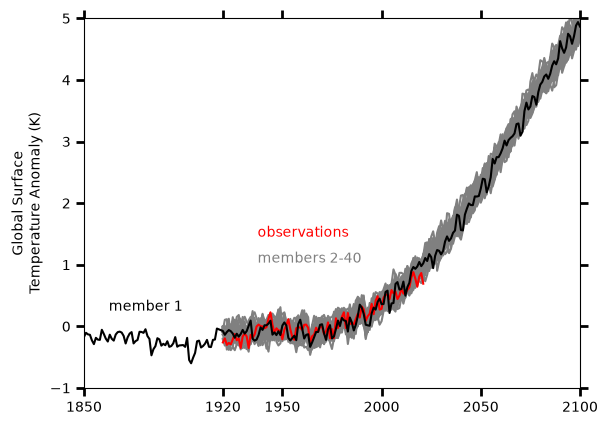
Figure 4
Compute linear trend for winter seasons
def linear_trend(da, dim="time"):
    da_chunk = da.chunk({dim: -1})
    trend = xr.apply_ufunc(
        calc_slope,
        da_chunk,
        vectorize=True,
        input_core_dims=[[dim]],
        output_core_dims=[[]],
        output_dtypes=[np.float64],
        dask="parallelized",
    )
    return trend


def calc_slope(y):
    """ufunc to be used by linear_trend"""
    x = np.arange(len(y))

    # drop missing values (NaNs) from x and y
    finite_indexes = ~np.isnan(y)
    slope = np.nan if (np.sum(finite_indexes) < 2) else np.polyfit(x[finite_indexes], y[finite_indexes], 1)[0]
    return slope
Compute ensemble trends
%%time
# Takes several minutes
t = xr.concat([t_20c, t_rcp], dim="time")
seasons = t.sel(time=slice("1979", "2012")).resample(time="QS-DEC").mean("time")
# Include only full seasons from 1979 and 2012
seasons = seasons.sel(time=slice("1979", "2012")).load()
CPU times: user 10.6 s, sys: 1.68 s, total: 12.3 s
Wall time: 33.6 s
winter_seasons = seasons.sel(
    time=seasons.time.where(seasons.time.dt.month == 12, drop=True)
)
winter_trends = linear_trend(
    winter_seasons.chunk({"lat": 20, "lon": 20, "time": -1})
).load() * len(winter_seasons.time)

# Compute ensemble mean from the first 30 members
winter_trends_mean = winter_trends.isel(member_id=range(30)).mean(dim='member_id')
/home/runner/micromamba/envs/cla-cookbook-dev/lib/python3.14/site-packages/distributed/client.py:3429: UserWarning: Sending large graph of size 286.89 MiB.
This may cause some slowdown.
Consider loading the data with Dask directly
or using futures or delayed objects to embed the data into the graph without repetition.
See also https://docs.dask.org/en/stable/best-practices.html#load-data-with-dask for more information.
warnings.warn(
Make sure that we have 34 seasons:
assert len(winter_seasons.time) == 34Get observations for Figure 4 (NASA GISS GisTemp)
This is observational time series data for comparison with ensemble average. Here we are using the GISS Surface Temperature Analysis (GISTEMP v4) from NASA’s Goddard Institute of Space Studies Lenssen et al., 2019.
Define the URL to Project Pythia’s Jetstream2 Object Store and the path to the Zarr file.
URL = 'https://js2.jetstream-cloud.org:8001'
filePath = 's3://pythia/gistemp1200_GHCNv4_ERSSTv5.zarr'
ds = xr.open_zarr(
filePath,
storage_options={"anon": True, "client_kwargs": {"endpoint_url": URL}},
consolidated=True,
chunks="auto",
)
dsCreate an Xarray Dataset from the Zarr object
Remap longitude range from [-180, 180] to [0, 360] for plotting purposes:
ds = ds.assign_coords(lon=((ds.lon + 360) % 360)).sortby('lon')
dsCompute observed trends
Include only full seasons from 1979 through 2012:
obs_seasons = ds.sel(time=slice("1979", "2012")).resample(time="QS-DEC").mean("time")
obs_seasons = obs_seasons.sel(time=slice("1979", "2012")).load()
obs_winter_seasons = obs_seasons.sel(
    time=obs_seasons.time.where(obs_seasons.time.dt.month == 12, drop=True)
)
obs_winter_seasonsAnd compute observed winter trends:
obs_winter_trends = linear_trend(
    obs_winter_seasons.drop_vars("time_bnds").chunk({"lat": 20, "lon": 20, "time": -1})
).load() * len(obs_winter_seasons.time)
obs_winter_trendsPlotting Figure 4
Global maps of historical (1979 - 2012) boreal winter (DJF) surface air trends:
contour_levels = [-6, -5, -4, -3, -2, -1.5, -1, -0.5, 0, 0.5, 1, 1.5, 2, 3, 4, 5, 6]
color_map = cmaps.ncl_default
def make_map_plot(nplot_rows, nplot_cols, plot_index, data, plot_label):
""" Create a single map subplot. """
ax = plt.subplot(nplot_rows, nplot_cols, plot_index, projection = ccrs.Robinson(central_longitude = 180))
cplot = plt.contourf(lons, lats, data,
levels = contour_levels,
cmap = color_map,
extend = 'both',
transform = ccrs.PlateCarree())
ax.coastlines(color = 'grey')
ax.text(0.01, 0.01, plot_label, fontsize = 14, transform = ax.transAxes)
return cplot, ax%%time
# Generate plot (may take a while as many individual maps are generated)
numPlotRows = 8
numPlotCols = 4
figWidth = 17.1
figHeight = 19.5
fig, axs = plt.subplots(numPlotRows, numPlotCols, figsize=(figWidth,figHeight))
# This will hide the ugly figure axes around each map
for ax in axs.flat:
ax.set_axis_off()
lats = winter_trends.lat
lons = winter_trends.lon
# Create ensemble member plots
for ensemble_index in range(30):
plot_data = winter_trends.isel(member_id = ensemble_index)
plot_index = ensemble_index + 1
plot_label = str(plot_index)
plotRow = ensemble_index // numPlotCols
plotCol = ensemble_index % numPlotCols
# Retain axes objects for figure colorbar
cplot, axs[plotRow, plotCol] = make_map_plot(numPlotRows, numPlotCols, plot_index, plot_data, plot_label)
# Create plots for the ensemble mean, observations, and a figure color bar.
cplot, axs[7,2] = make_map_plot(numPlotRows, numPlotCols, 31, winter_trends_mean, 'EM')
lats = obs_winter_trends.lat
lons = obs_winter_trends.lon
cplot, axs[7,3] = make_map_plot(numPlotRows, numPlotCols, 32, obs_winter_trends.tempanomaly, 'OBS')
cbar = fig.colorbar(cplot, ax=axs, orientation='horizontal', shrink = 0.7, pad = 0.02)
cbar.ax.set_title('1979-2012 DJF surface air temperature trends (K/34 years)', fontsize = 16)
cbar.set_ticks(contour_levels)
cbar.set_ticklabels(contour_levels)
plt.rcParams['figure.constrained_layout.use'] = TrueCPU times: user 53.6 s, sys: 1.85 s, total: 55.5 s
Wall time: 52.6 s
/home/runner/micromamba/envs/cla-cookbook-dev/lib/python3.14/site-packages/cartopy/io/__init__.py:263: DownloadWarning: Downloading: https://naturalearth.s3.amazonaws.com/110m_physical/ne_110m_coastline.zip
  warnings.warn(f'Downloading: {url}', DownloadWarning)
Close our client:
client.close()Summary
In this notebook, we used CESM LENS data hosted on AWS to recreate two key figures in the paper that describes the project.
What’s next?
More example workflows using these datasets may be added in the future.
- Kay, J. E., Deser, C., Phillips, A., Mai, A., Hannay, C., Strand, G., Arblaster, J. M., Bates, S. C., Danabasoglu, G., Edwards, J., Holland, M., Kushner, P., Lamarque, J.-F., Lawrence, D., Lindsday, K., Middleton, A., Munoz, E., Neale, R., Oleson, K., … Vertenstein, M. (2015). The Community Earth System Model (CESM) Large Ensemble Project. Bull. Amer. Meteor. Soc. 10.1175/BAMS-D-13-00255.1
- Morice, C. P., Kennedy, J. J., Rayner, N. A., & Jones, P. D. (2012). Quantifying uncertainties in global and regional temperature change using an ensemble of observational estimates: The HadCRUT4 data set. J. Geophys. Res. Atmos., 117(D8). 10.1029/2011JD017187
- Lenssen, N., Schmidt, G., Hansen, J., Menne, M., Persin, A., Ruedy, R., & Zyss, D. (2019). Improvements in the GISTEMP uncertainty model. Journal of Geophysical Research: Atmospheres, 124(12), 6307–6326. 10.1029/2018JD029522