
In this tutorial, you learn:
Using Dask with Xarray
Read/write netCDF files with Dask
Dask backed Xarray objects and operations
Extract Dask arrays from Xarray objects and use Dask array directly.
Xarray built-in operations can transparently use dask
Prerequisites
| Concepts | Importance | Notes |
|---|---|---|
| Intro to Xarray | Necessary | |
| Dask Arrays | Necessary | |
| Dask DataFrames | Necessary |
Time to learn: 40 minutes
Introduction
Xarray Quick Overview
Xarray is an open-source Python library designed for working with labelled multi-dimensional data. By multi-dimensional data (also often called N-dimensional), we mean data that has many independent dimensions or axes (e.g. latitude, longitude, time). By labelled we mean that these axes or dimensions are associated with coordinate names (like “latitude”) and coordinate labels like “30 degrees North”.
Xarray provides pandas-level convenience for working with this type of data.
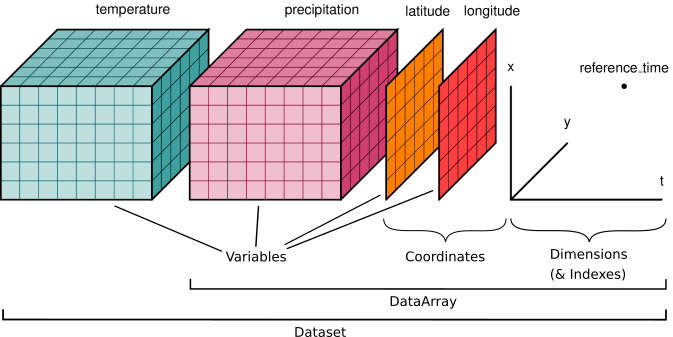
Image credit: Xarray Contributors
The dataset illustrated has two variables (temperature and precipitation) that have three dimensions. Coordinate vectors (e.g., latitude, longitude, time) that describe the data are also included.
Xarray Data Structures
Xarray has two fundamental data structures:
DataArray: holds a single multi-dimensional variable and its coordinatesDataset: holds multiple DataArrays that potentially share the same coordinates
Xarray DataArray
A DataArray has four essential attributes:
data: anumpy.ndarrayholding the values.dims: dimension names for each axis (e.g., latitude, longitude, time).coords: a dict-like container of arrays (coordinates) that label each point (e.g., 1-dimensional arrays of numbers, datetime objects or strings).attrs: a dictionary to hold arbitrary metadata (attributes).
Xarray DataSet
A dataset is simply an object containing multiple Xarray DataArrays indexed by variable name.
Xarray can wrap many array types like Numpy and Dask.
Let’s start with a random 2D NumPy array, for example this can be SST (sea-surface temperature) values of a domain with dimension of 300x450 grid:
import numpy as np
import dask.array as da
import xarray as xr
import gdown
import tarfile

xr.set_options(display_expand_data=False);
# -- numpy array
sst_np = np.random.rand(300,450)
type(sst_np)numpy.ndarrayAs we saw in the previous tutorial, we can convert them to a Dask Array:
sst_da = da.from_array( sst_np)
sst_daThis is great and fast! BUT
What if we want to attach coordinate values to this array?
What if we want to add metadata (e.g. units) to this array?
# similarly we can convert them to xarray datarray
sst_xr = xr.DataArray(sst_da)
sst_xrA simple DataArray without dimensions or coordinates isn’t much use.
# we can add dimension names to this:
sst_xr = xr.DataArray(sst_da,dims=['lat','lon'])

sst_xr.dims
('lat', 'lon')We can add our coordinates with values to it :
# -- create some dummy values for lat and lon dimensions
lat = np.random.uniform(low=-90, high=90, size=300)
lon = np.random.uniform(low=-180, high=180, size=450)

sst_xr = xr.DataArray(sst_da,
                      dims=['lat','lon'],
                      coords={'lat': lat, 'lon':lon},
                      attrs=dict(
                        description="Sea Surface Temperature.",
                        units="degC")
                     )
sst_xrXarray data structures are a very powerful tool that allows us to use metadata to express different analysis patterns (slicing, selecting, groupby, averaging, and many other things).
Take Away
Xarray DataArray provides a wrapper around arrays, and uses labeled dimensions and coordinates to support metadata-aware operations (e.g. da.sum(dim="time") instead of array.sum(axis=-1))
Xarray can wrap dask arrays instead of numpy arrays.
This capability turns Xarray into an extremely useful tool for Big Data earth science.
With this introduction, let’s start our tutorial on features of Xarray and Dask:
Setup: Spinning up a cluster
from dask.distributed import LocalCluster, Client
cluster = LocalCluster()
client = Client(cluster)
client
Reading data with Dask and Xarray
Reading multiple netCDF files with open_mfdataset
Xarray provides a function called open_dataset function that allows us to load a netCDF dataset into a Python data structure. To read more about this function, please see xarray open_dataset API documentation.
Xarray also provides open_mfdataset, which open multiple files as a single xarray dataset. Passing the argument parallel=True will speed up reading multiple datasets by executing these tasks in parallel using Dask Delayed under the hood.
In this example, we are going to examine a subset of CESM2 Large Ensemble Data Sets (LENS). We will use 2m temperature (TREFHT) for this analysis.
To learn more about LENS dataset, please visit:
For this tutorial, we only look at a small subset of data. If you don’t have the data, running the following code enables you to download, prepare, and stage the required datasets (../data/ folder) for this cookbook.
file_id = '1Tbuom1KMCwHjy7-eexEQcOXSr51i6mae'
output_path = '../data/data.tar.gz'

url = f'https://drive.google.com/uc?export=download&id={file_id}'
gdown.download(url, output_path, quiet=False)

# Extract to data/data_for_cesm directory
with tarfile.open(output_path, 'r:gz') as tar:
    tar.extractall('../data/')
Downloading...
From (original): https://drive.google.com/uc?id=1Tbuom1KMCwHjy7-eexEQcOXSr51i6mae
From (redirected): https://drive.google.com/uc?id=1Tbuom1KMCwHjy7-eexEQcOXSr51i6mae&confirm=t&uuid=594cb05a-22be-4c73-a312-c782c61c580e
To: /home/runner/work/dask-cookbook/dask-cookbook/data/data.tar.gz
0%| | 0.00/127M [00:00<?, ?B/s] 0%| | 524k/127M [00:00<00:35, 3.60MB/s] 2%|▏ | 2.62M/127M [00:00<00:10, 11.6MB/s] 7%|▋ | 8.91M/127M [00:00<00:06, 19.5MB/s] 12%|█▏ | 15.2M/127M [00:00<00:04, 24.4MB/s] 15%|█▌ | 19.4M/127M [00:00<00:03, 27.2MB/s] 18%|█▊ | 23.1M/127M [00:00<00:03, 27.5MB/s] 23%|██▎ | 29.4M/127M [00:01<00:03, 25.6MB/s] 27%|██▋ | 33.6M/127M [00:01<00:03, 25.7MB/s] 31%|███▏ | 39.8M/127M [00:02<00:05, 15.4MB/s] 38%|███▊ | 48.2M/127M [00:02<00:04, 16.0MB/s] 41%|████▏ | 52.4M/127M [00:02<00:04, 15.7MB/s] 48%|████▊ | 60.8M/127M [00:03<00:04, 15.7MB/s] 57%|█████▋ | 72.4M/127M [00:03<00:02, 18.9MB/s] 62%|██████▏ | 78.6M/127M [00:04<00:02, 21.4MB/s] 64%|██████▍ | 81.3M/127M [00:04<00:02, 19.6MB/s] 72%|███████▏ | 90.7M/127M [00:04<00:02, 16.7MB/s] 80%|███████▉ | 101M/127M [00:05<00:01, 17.7MB/s] 92%|█████████▏| 117M/127M [00:05<00:00, 27.3MB/s] 99%|█████████▉| 125M/127M [00:06<00:00, 20.8MB/s]100%|██████████| 127M/127M [00:06<00:00, 19.9MB/s]
We can open up multiple files using open_mfdataset function.
Constructing Xarray Datasets from files
import os
import glob

var = 'TREFHT'

# find all LENS files for 1 ensemble
data_dir = '../data/data_for_cesm'
files = glob.glob(os.path.join(data_dir, 'b.e21.BSSP370smbb.f09_g17.LE2-1301.013*.nc'))

print("All files: [", len(files), "files]")
All files: [ 9 files]
%%time
ds = xr.open_mfdataset(
    sorted(files),
    # concatenate along this dimension
    concat_dim="time",
    # concatenate files in the order provided
    combine="nested",
    # parallelize the reading of individual files using dask
    # This means the returned arrays will be dask arrays
    parallel=True,
    # these are netCDF4 files, use the h5netcdf package to read them
    engine="h5netcdf",
    # hold off on decoding time
    decode_cf=False,
    # specify that data should be automatically chunked
    chunks="auto",
)
ds = xr.decode_cf(ds)
ds
<timed exec>:1: FutureWarning: In a future version of xarray the default value for data_vars will change from data_vars='all' to data_vars=None. This is likely to lead to different results when multiple datasets have matching variables with overlapping values. To opt in to new defaults and get rid of these warnings now use `set_options(use_new_combine_kwarg_defaults=True) or set data_vars explicitly.
CPU times: user 371 ms, sys: 39.6 ms, total: 411 ms
Wall time: 3.01 s
For complex scenarios, you can access each file individually by utilizing the open_dataset function with the specified chunks and then combine the outputs into a single dataset later.
Note that the “real” values are not displayed, since that would trigger actual computation.
Xarray automatically wraps Dask Arrays and Dask is lazy, meaning that operations are not computed until we explicitly request them, for example by calling .compute().
Please see previous notebooks for more information on “lazy evaluation”.
The represntation of TREFHT DataArray shows details of chunks and chunk-sizes of Xarray DataArray:
tref = ds.TREFHT
treftref.chunks((120, 120, 120, 120, 120, 120, 120, 120, 72), (192,), (288,))How many chunks do we have?
What is the size of each chunk size?
Here we can see that we have a total of 9 chunks - equal to the number of our netCDF files. In general open_mfdataset will return one chunk per netCDF file.
WARNING: The chunk structure within the file is important. When re-chunking the dataset after creation with ds.chunk() it is recommended to only use multiples of the on-file chunk shape.
We can check what that shape is by looking at the encoding:
tref.encoding{'dtype': dtype('float32'),
'contiguous': False,
'chunksizes': (1, 192, 288),
'preferred_chunks': {'time': 1, 'lat': 192, 'lon': 288},
'zlib': True,
'szip': False,
'bzip2': False,
'blosc': False,
'zstd': False,
'shuffle': True,
'fletcher32': False,
'complevel': 1,
'source': '/home/runner/work/dask-cookbook/dask-cookbook/data/data_for_cesm/b.e21.BSSP370smbb.f09_g17.LE2-1301.013.cam.h0.TREFHT.201501-202412.nc',
'original_shape': (120, 192, 288)}TIP: The chunks parameter can significantly affect total performance when using Dask Arrays. chunks should be small enough that each chunk fit in the memory, but large enough to avoid that the communication overhead.
A good rule of thumb is to create arrays with a minimum chunksize of at least one million elements. Here we have 120x192x288 elements in each chunk (except for the last chunk).
With large arrays (10+ GB), the cost of queuing up Dask operations can be noticeable, and you may need even larger chunksizes.
Additional Reading
Xarray data structures are Dask collections.
This means you can call the following Dask-related functions on Xarray Data Arrays and Datasets:
.visualize().compute().persist()
For more information about Dask Arrays, please see Dask Array chapter.
tref_mean = tref.mean('time')
tref_mean.data.daskIf we check Dask Task Graph for tref_mean, we can see all the steps required for calculating it (from opening the netcdf file to calculating mean and aggreagting it).
Getting concrete values
At some point, you will want to actually do the calculations and receive concrete values from Dask.
There are two ways to compute values on dask arrays.
compute()returns a new xarray object with the data now represented as a numpy array.load()replaces the dask array in the xarray object with a numpy array. Equivalent tods = ds.compute().
.load() operates inplace and .compute() returns a new xarray object.
Distributed non-blocking concrete values
There is another option available third option : “persisting”. .persist() loads the values into distributed RAM. The values are computed but remain distributed across workers. So essentially persist turns a lazy Dask collection into a Dask collection where the results are either fully computed or actively computing in the background.
So ds.air.persist() is still backed by a Dask array. This is useful if you will be repeatedly using a dataset for computation but it is too large to load into local memory.
Read more: Dask user guide
How to access underlying data in an Xarray object?
There are two basic ways to extract values from an Xarray object:
Using
.datawill return a Dask array. For example:
tref.dataThis means that for Dask-backed Xarray object, we can access the values using .compute
%%time

tref.data.compute()
CPU times: user 241 ms, sys: 93.2 ms, total: 334 ms
Wall time: 1.06 s
array([[[248.39987, 248.39989, 248.39992, ..., 248.39989, 248.39989,
         248.39989],
        [248.95004, 248.9094 , 248.75017, ..., 248.98384, 248.97466,
         248.9626 ],
        [249.20784, 249.17082, 249.15718, ..., 249.42188, 249.37703,
         249.31105],
        ...,
        [251.5821 , 251.6182 , 251.65166, ..., 251.48357, 251.51555,
         251.54646],
        [251.34143, 251.35114, 251.36166, ..., 251.30699, 251.32008,
         251.3312 ],
        [251.35237, 251.35286, 251.35332, ..., 251.35059, 251.35123,
         251.35182]],

       [[237.44759, 237.44759, 237.44759, ..., 237.44759, 237.44759,
         237.44759],
        [238.10292, 238.05934, 237.8917 , ..., 238.16042, 238.14326,
         238.12119],
        [238.86865, 238.82155, 238.79092, ..., 239.1196 , 239.04976,
         238.96754],
        ...,
        [246.23404, 246.25865, 246.28221, ..., 246.15912, 246.18312,
         246.20715],
        [246.70511, 246.7112 , 246.71793, ..., 246.68782, 246.69476,
         246.69987],
        [247.26158, 247.26067, 247.25984, ..., 247.26494, 247.2637 ,
         247.26259]],

       [[227.2174 , 227.2174 , 227.2174 , ..., 227.2174 , 227.2174 ,
         227.2174 ],
        [227.27689, 227.23364, 227.07358, ..., 227.32939, 227.3166 ,
         227.2957 ],
        [227.58324, 227.54382, 227.52094, ..., 227.81204, 227.76472,
         227.69241],
        ...,
        [247.57649, 247.60806, 247.63834, ..., 247.49849, 247.52321,
         247.54758],
        [247.34538, 247.35608, 247.36736, ..., 247.30998, 247.32211,
         247.33403],
        [247.2048 , 247.20529, 247.20573, ..., 247.20308, 247.20372,
         247.20428]],

       ...,

       [[230.82976, 230.82976, 230.82976, ..., 230.82976, 230.82976,
         230.82976],
        [231.51309, 231.47168, 231.3188 , ..., 231.55086, 231.54416,
         231.53171],
        [232.11208, 232.0665 , 232.04721, ..., 232.34473, 232.29143,
         232.22214],
        ...,
        [273.3896 , 273.38998, 273.3906 , ..., 273.3897 , 273.3895 ,
         273.3894 ],
        [273.46066, 273.46008, 273.45963, ..., 273.4635 , 273.4624 ,
         273.46143],
        [273.5544 , 273.55417, 273.55392, ..., 273.5554 , 273.55505,
         273.55472]],

       [[240.62163, 240.62163, 240.62163, ..., 240.62163, 240.62163,
         240.62163],
        [241.24452, 241.20761, 241.05177, ..., 241.27812, 241.26988,
         241.2583 ],
        [241.4827 , 241.44122, 241.42111, ..., 241.70222, 241.65529,
         241.58728],
        ...,
        [271.83112, 271.82843, 271.82672, ..., 271.84128, 271.83743,
         271.8343 ],
        [272.06815, 272.06625, 272.06448, ..., 272.07593, 272.07327,
         272.07053],
        [272.28296, 272.2825 , 272.2821 , ..., 272.28467, 272.28403,
         272.28348]],

       [[250.27185, 250.2721 , 250.27223, ..., 250.27199, 250.27199,
         250.27194],
        [251.08855, 251.05937, 250.90967, ..., 251.1056 , 251.10072,
         251.09595],
        [251.64214, 251.61182, 251.6042 , ..., 251.83585, 251.79689,
         251.7379 ],
        ...,
        [271.2762 , 271.2781 , 271.28018, ..., 271.2714 , 271.27295,
         271.27457],
        [271.2889 , 271.28967, 271.2904 , ..., 271.28693, 271.28738,
         271.28815],
        [271.26477, 271.26483, 271.2649 , ..., 271.26456, 271.26465,
         271.2647 ]]], shape=(1032, 192, 288), dtype=float32)
We can also use
.valuesto see the “real” values of Xarray object. Another option is using.to_numpy. Both of these option return the values of underlying Dask object in a numpy array.
%%time
tref.to_numpy()
CPU times: user 67.3 ms, sys: 103 ms, total: 171 ms
Wall time: 936 ms
array([[[248.39987, 248.39989, 248.39992, ..., 248.39989, 248.39989,
         248.39989],
        [248.95004, 248.9094 , 248.75017, ..., 248.98384, 248.97466,
         248.9626 ],
        [249.20784, 249.17082, 249.15718, ..., 249.42188, 249.37703,
         249.31105],
        ...,
        [251.5821 , 251.6182 , 251.65166, ..., 251.48357, 251.51555,
         251.54646],
        [251.34143, 251.35114, 251.36166, ..., 251.30699, 251.32008,
         251.3312 ],
        [251.35237, 251.35286, 251.35332, ..., 251.35059, 251.35123,
         251.35182]],

       [[237.44759, 237.44759, 237.44759, ..., 237.44759, 237.44759,
         237.44759],
        [238.10292, 238.05934, 237.8917 , ..., 238.16042, 238.14326,
         238.12119],
        [238.86865, 238.82155, 238.79092, ..., 239.1196 , 239.04976,
         238.96754],
        ...,
        [246.23404, 246.25865, 246.28221, ..., 246.15912, 246.18312,
         246.20715],
        [246.70511, 246.7112 , 246.71793, ..., 246.68782, 246.69476,
         246.69987],
        [247.26158, 247.26067, 247.25984, ..., 247.26494, 247.2637 ,
         247.26259]],

       [[227.2174 , 227.2174 , 227.2174 , ..., 227.2174 , 227.2174 ,
         227.2174 ],
        [227.27689, 227.23364, 227.07358, ..., 227.32939, 227.3166 ,
         227.2957 ],
        [227.58324, 227.54382, 227.52094, ..., 227.81204, 227.76472,
         227.69241],
        ...,
        [247.57649, 247.60806, 247.63834, ..., 247.49849, 247.52321,
         247.54758],
        [247.34538, 247.35608, 247.36736, ..., 247.30998, 247.32211,
         247.33403],
        [247.2048 , 247.20529, 247.20573, ..., 247.20308, 247.20372,
         247.20428]],

       ...,

       [[230.82976, 230.82976, 230.82976, ..., 230.82976, 230.82976,
         230.82976],
        [231.51309, 231.47168, 231.3188 , ..., 231.55086, 231.54416,
         231.53171],
        [232.11208, 232.0665 , 232.04721, ..., 232.34473, 232.29143,
         232.22214],
        ...,
        [273.3896 , 273.38998, 273.3906 , ..., 273.3897 , 273.3895 ,
         273.3894 ],
        [273.46066, 273.46008, 273.45963, ..., 273.4635 , 273.4624 ,
         273.46143],
        [273.5544 , 273.55417, 273.55392, ..., 273.5554 , 273.55505,
         273.55472]],

       [[240.62163, 240.62163, 240.62163, ..., 240.62163, 240.62163,
         240.62163],
        [241.24452, 241.20761, 241.05177, ..., 241.27812, 241.26988,
         241.2583 ],
        [241.4827 , 241.44122, 241.42111, ..., 241.70222, 241.65529,
         241.58728],
        ...,
        [271.83112, 271.82843, 271.82672, ..., 271.84128, 271.83743,
         271.8343 ],
        [272.06815, 272.06625, 272.06448, ..., 272.07593, 272.07327,
         272.07053],
        [272.28296, 272.2825 , 272.2821 , ..., 272.28467, 272.28403,
         272.28348]],

       [[250.27185, 250.2721 , 250.27223, ..., 250.27199, 250.27199,
         250.27194],
        [251.08855, 251.05937, 250.90967, ..., 251.1056 , 251.10072,
         251.09595],
        [251.64214, 251.61182, 251.6042 , ..., 251.83585, 251.79689,
         251.7379 ],
        ...,
        [271.2762 , 271.2781 , 271.28018, ..., 271.2714 , 271.27295,
         271.27457],
        [271.2889 , 271.28967, 271.2904 , ..., 271.28693, 271.28738,
         271.28815],
        [271.26477, 271.26483, 271.2649 , ..., 271.26456, 271.26465,
271.2647 ]]], shape=(1032, 192, 288), dtype=float32)Computation
All built-in Xarray methods (.mean, .max, .rolling, .groupby etc.) support dask arrays.
Now, let’s do some computations on this Xarray dataset.
Single Point Calculations
To start out, let’s do the calculations on a single point first. First, we extract the time series data at a grid point and save it to a variable. Here we select the closest point using .sel and load the data.
tref_boulder = tref.sel(lat=40.0150, lon=-105.2705, method='nearest').load()WARNING: Remember as soon as you call .load() you are telling Dask to trigger computation.
# -- take annual average
tb = tref_boulder.resample(time='AS').mean()
tb
<string>:7: FutureWarning: 'AS' is deprecated and will be removed in a future version. Please use 'YS' instead of 'AS'.
We can either see the values of our DataArray in the text representation above or by plotting it:
tb.plot();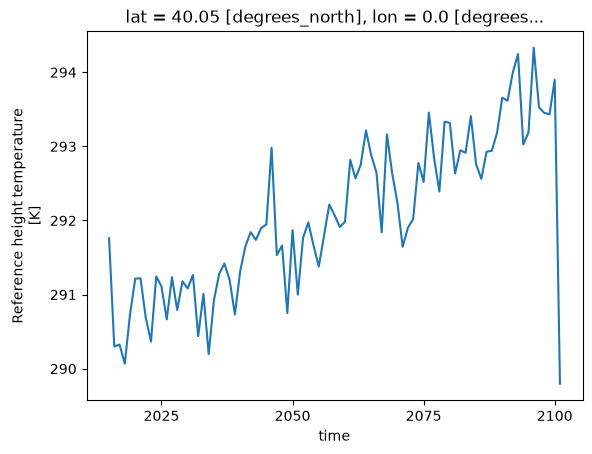
Calculations over all grids
# change the unit from Kelvin to degree Celsius
tref_c = tref - 273.15
tref_c%%time
tref_c = tref_c.load()CPU times: user 70.4 ms, sys: 108 ms, total: 178 ms
Wall time: 963 ms
%%time

# Compute monthly anomaly

# -- 1. calculate monthly average
tref_grouped = tref.groupby('time.month')
tmean = tref_grouped.mean(dim='time')

#-- 2. calculate monthly anomaly
tos_anom = tref_grouped - tmean
tos_anom
CPU times: user 81.2 ms, sys: 2.09 ms, total: 83.3 ms
Wall time: 88.1 ms
%%time
computed_anom = tos_anom.load()
type(computed_anom)
CPU times: user 1.46 s, sys: 173 ms, total: 1.64 s
Wall time: 4.59 s
xarray.core.dataarray.DataArraytos_anom.sel(lon=310, lat=50, method='nearest').plot( size=4);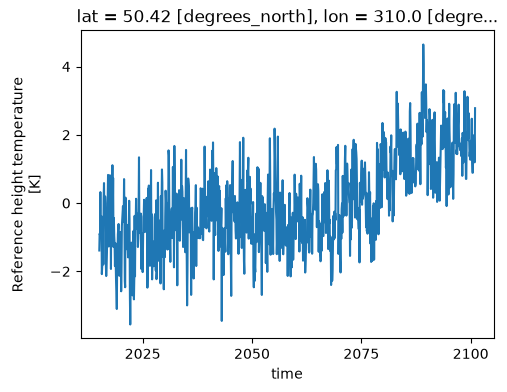
tos_anom.sel(time='2030-01-01').plot();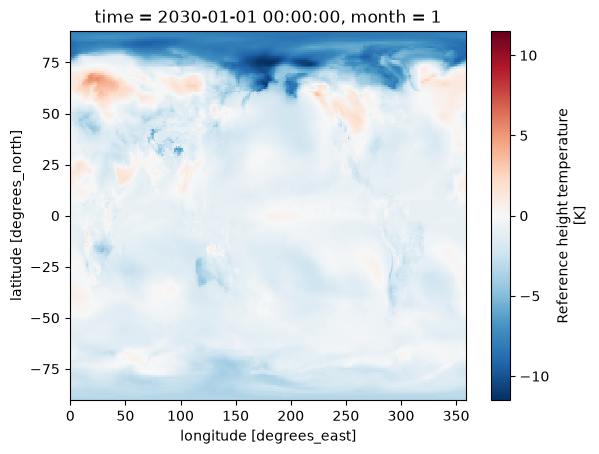
TIP: Using Xarray plotting functionality automatically triggers computations on the Dask Array, similar to .compute().
We can do more complex calculations too:
rolling_mean = tref.rolling(time=5).mean()
rolling_mean # contains dask arraytimeseries = rolling_mean.isel(lon=1, lat=20) # no activity on dashboard
timeseries # contains dask arraycomputed = rolling_mean.compute() # activity on dashboard
computed # has real numpy valuesSupplementary Material: Advanced workflows and automatic parallelization using apply_ufunc
Most of xarray’s built-in operations work on Dask arrays. If you want to use a function that isn’t wrapped by Xarray to work with Dask, one option is to extract Dask arrays from xarray objects (.data) and use Dask directly.
Another option is to use xarray’s apply_ufunc() function. xr.apply_ufunc() can automate embarrassingly parallel “map” type operations where a function written for processing NumPy arrays, but we want to apply it on our Xarray DataArray.
xr.apply_ufunc() give users capability to run custom-written functions such as parameter calculations in a parallel way. See the Xarray tutorial material on apply_ufunc for more.
In the example below, we calculate the saturation vapor pressure by using apply_ufunc() to apply this function to our Dask Array chunk by chunk.
import numpy as np

def sat_p(t):
    """Calculate saturation vapor pressure using Clausius-Clapeyron equation"""
    return 0.611 * np.exp(17.67 * (t-273.15)*((t-29.65)**(-1)))
es = xr.apply_ufunc(sat_p, tref, dask="parallelized", output_dtypes=[float])
eses.compute()The data used for this tutorial is from one ensemble member. What if we want to use multiple ensemble members? So far, we only run on one machine, what if we run an HPC cluster? We will go over this in the next tutorial.
Dask + Xarray Good Practices
Summary of Dask + Xarray Good Practices
The good practices regarding Dask + Xarray is the same as the good practices for Dask only.
Similar to Dask DataFrames, it is more efficient to first do spatial and temporal indexing (e.g. .sel() or .isel()) and filter the dataset early in the pipeline, especially before calling resample() or groupby().
Chunk sizes should be small enough to fit into the memory at once but large enough to avoid the additional communication overhead. Good chunk size ~100 MB.
It is always better to chunk along the
timedimension.Avoid too many tasks since each task will introduce 1ms of overhead.
When possible, use
xr.apply_ufuncto apply an unvectorized function to the Xarray object.
Close you local Dask Cluster
It is always a good practice to close the Dask cluster you created.
client.shutdown()Summary
In this notebook, we have learned about:
Using Dask with Xarray
Read/write netCDF files with Dask
Dask backed Xarray objects and operations
Extract Dask arrays from Xarray objects and use Dask array directly..
Customized workflows using
apply_ufunc
Resources and references
Reference
Xarray + Dask docs, particularly the best practices
Ask for help
dasktag on Stack Overflow, for usage questionsgithub discussions: dask for general, non-bug, discussion, and usage questions
github issues: dask for bug reports and feature requests
github discussions: xarray for general, non-bug, discussion, and usage questions
github issues: xarray for bug reports and feature requests