Overview
Now that you’ve learned about the OSDF and the Pelican command line client, you may be wondering how you can easily access that data from within a notebook using python.
You can do this using PelicanFS, which is an FSSPec implementation of the Pelican client.
This notebook will contain:
A brief explanation of FSSPec and PelicanFS
A real-world example using FSSPec, Pelican, Xarray, and Zarr
Other common access patterns
FAQs
Prerequisites
To better understand this notebook, please familiarize yourself with the following concepts:
| Concepts | Importance | Notes |
|---|---|---|
| Intro to OSDF | Necessary | |
| Understanding of Xarray | Helpful | To better understand the example workflow |
| Overview of FSSpec | Helpful | To better understand the FSSpec library |
Time to learn: 20-30 minutes
Imports
import xarray as xr
import numpy as np
import matplotlib.pyplot as plt
import cartopy.crs as ccrs
import cartopy.feature as cfeature
import metpy.calc as mpcalc
from metpy.units import units
import fsspec
import intake
/home/runner/micromamba/envs/osdf-cookbook/lib/python3.12/site-packages/tqdm/auto.py:21: TqdmWarning: IProgress not found. Please update jupyter and ipywidgets. See https://ipywidgets.readthedocs.io/en/stable/user_install.html
from .autonotebook import tqdm as notebook_tqdm
What are PelicanFS and FSSPec?
First, let’s understand PelicanFS and how it integrates with FSSpec
FSSPec
FileSystem Spec (fsspec) is a python library which endeavors to provide a unified interface to many different storage backends. This includes, but is not limited to, POSIX, https, and S3. It’s used by various data processing libraries such as xarray, pandas, and intake, just to name a few.
To learn more about FSSPec, visit its information page.
Schemes
FSSpec figures out how to interact with data from different storage backends through the scheme in the data path. For example, FSSpec knows to use the “Hyper Text Transfer Protocol” interface whenever it sees URLs with the https: scheme. This lets users interact with data from a variety of storage technologies without forcing them to know how those technologies work under the hood.
PelicanFS
PelicanFS is an implementation of FSSpec that introduces two new schemes to FSSpec: pelican and osdf. PelicanFS enables you to use the pelican:// scheme to access data via Pelican Federations like the OSDF in any software that already understands FSSpec. To use it, you must specify the federation host name. A Pelican path looks like:
pelican://<federation-host-name>/<namespace-path>
The osdf scheme is a specific instance of the pelican scheme that knows how to access the OSDF. A path using the osdf scheme should not provide the federation root. An OSDF path looks like:
osdf:///<namespace-path>
PelicanFS teaches FSSpec how to interact with the Pelican protocol using the above pelican:-schemed or osdf:-schemed URLs.
If you’d like to understand more about how pelican works, check out the documentation here.
Putting it all together
What does this mean in practice?
If you want to access data from the OSDF using FSSpec or any library that uses FSSpec, build the osdf-schemed URL for the data and use that URL as your data path and then FSSpec and PelicanFS will do all the work to resolve it behind the scenes.
A PelicanFS Example using Real Data
The following is an example that shows how PelicanFS works on real world data using FSSPec and Xarray to access Zarr data from AWS.
This portion of the notebook is based off of the Project Pythia HRRR AWS Cookbook
Setting the Proper Path
The data for this tutorial is part of AWS Open Data, hosted in the us-west-1 region. The OSDF provides access to that region using the /aws-opendata/us-west-1 namespace.
Let’s first create a path which uses the osdf scheme.
# Set the date, hour, variable, and level for the HRRR data
date = '20211016'
hour = '21'
var = 'TMP'
level = '2m_above_ground'

# Construct object paths for the Zarr datasets using the osdf scheme
namespace_object1 = f'osdf:///aws-opendata/us-west-1/hrrrzarr/sfc/{date}/{date}_{hour}z_anl.zarr/{level}/{var}/{level}/'
namespace_object2 = f'osdf:///aws-opendata/us-west-1/hrrrzarr/sfc/{date}/{date}_{hour}z_anl.zarr/{level}/{var}/'
Using FSSpec to access the data
Now we can access the data using XArray as usual. The two objects will be accessed using fsspec’s get_mapper function, which knows to use PelicanFS because we created the path using the osdf scheme.
# Get mappers for the Zarr datasets

object1 = fsspec.get_mapper(namespace_object1)
object2 = fsspec.get_mapper(namespace_object2)

# Open the datasets
ds = xr.open_mfdataset([object1, object2], engine='zarr', decode_timedelta=True)

# Display the dataset
dsContinue the workflow
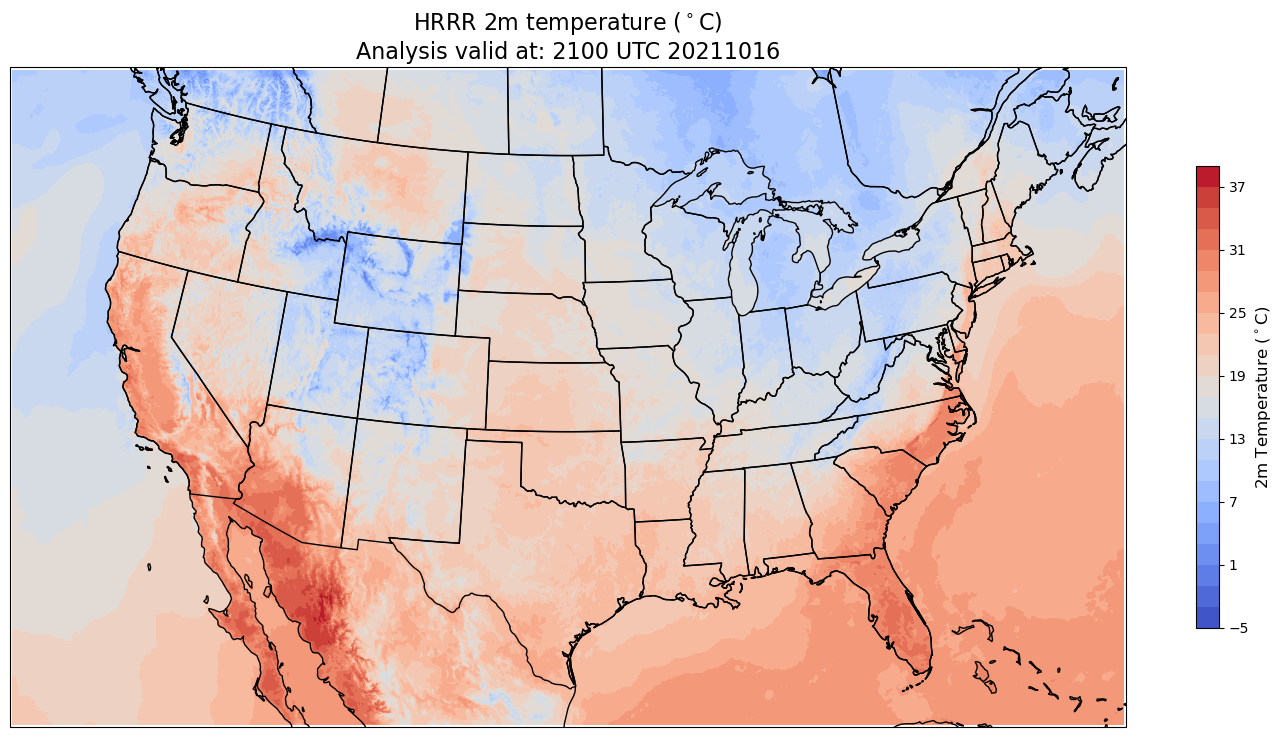
As you can see, Xarray streamed the data correctly into the datasets. To prove the workflow works, the next cell continues the computation and generates two plots. This tutorial will not go in depth as to what this code is accomplishing.
If you’d like to know more about the following workflow, please refer to the Project Pythia HRRR AWS Cookbook
# Define coordinates for projection
lon1 = -97.5
lat1 = 38.5
slat = 38.5

# Define the Lambert Conformal projection
projData = ccrs.LambertConformal(
    central_longitude=lon1,
    central_latitude=lat1,
    standard_parallels=[slat, slat],
    globe=ccrs.Globe(
        semimajor_axis=6371229,
        semiminor_axis=6371229
    )
)

# Display dataset coordinates
ds.coords

# Extract temperature data
airTemp = ds.TMP

# Display the temperature data
airTemp

# Convert temperature units to Celsius
airTemp = airTemp.metpy.convert_units('degC')

# Display the converted temperature data
airTemp

# Extract projection coordinates
x = airTemp.projection_x_coordinate
y = airTemp.projection_y_coordinate

# Plot temperature data
airTemp.plot(figsize=(11, 8.5))

# Compute minimum and maximum temperatures
minTemp = airTemp.min().compute()
maxTemp = airTemp.max().compute()

# Display minimum and maximum temperature values
minTemp.values, maxTemp.values

# Define contour levels
fint = np.arange(np.floor(minTemp.values), np.ceil(maxTemp.values) + 2, 2)

# Define plot bounds and resolution
latN = 50.4
latS = 24.25
lonW = -123.8
lonE = -71.2
res = '50m'

# Create a figure and axis with projection
fig = plt.figure(figsize=(18, 12))
ax = plt.subplot(1, 1, 1, projection=projData)
ax.set_extent([lonW, lonE, latS, latN], crs=ccrs.PlateCarree())
ax.add_feature(cfeature.COASTLINE.with_scale(res))
ax.add_feature(cfeature.STATES.with_scale(res))

# Add the title
tl1 = 'HRRR 2m temperature ($^\\circ$C)'
tl2 = f'Analysis valid at: {hour}00 UTC {date}'
plt.title(f'{tl1}\n{tl2}', fontsize=16)

# Contour fill
CF = ax.contourf(x, y, airTemp, levels=fint, cmap=plt.get_cmap('coolwarm'))

# Make a colorbar for the ContourSet returned by the contourf call
cbar = fig.colorbar(CF, shrink=0.5)
cbar.set_label(r'2m Temperature ($^\circ$C)', size='large')

# Show the plot
plt.show()
/home/runner/micromamba/envs/osdf-cookbook/lib/python3.12/site-packages/cartopy/io/__init__.py:263: DownloadWarning: Downloading: https://naturalearth.s3.amazonaws.com/50m_physical/ne_50m_coastline.zip
  warnings.warn(f'Downloading: {url}', DownloadWarning)
/home/runner/micromamba/envs/osdf-cookbook/lib/python3.12/site-packages/cartopy/io/__init__.py:263: DownloadWarning: Downloading: https://naturalearth.s3.amazonaws.com/50m_cultural/ne_50m_admin_1_states_provinces_lakes.zip
  warnings.warn(f'Downloading: {url}', DownloadWarning)
Other Ways to Access
There are other common ways to access data and use data with FSSpec and PelicanFS. This section will will cover the following topics
Using an Intake Catalog
Directly Accessing Data
Intake Catalog
In order to use PelicanFS with an Intake catalog, the paths in the catalog itself need to use the osdf or pelican schemes.
Here’s an example using the catalog located at https://
An entry in the catalog’s csv file looks like:
HighResMIP,CMCC,CMCC-CM2-HR4,highresSST-present,r1i1p1f1,Amon,ta,gn,osdf:///aws-opendata/us-west-2/cmip6-pds/CMIP6/HighResMIP/CMCC/CMCC-CM2-HR4/highresSST-present/r1i1p1f1/Amon/ta/gn/v20170706/,,20170706Notice how the path is using the ‘osdf’ scheme and the ‘/aws-opendata/us-west-2’ namespace. If all the paths in the csv file are formatted like this, then you can use the Intake catalog exactly as usual.
Here is a workflow and plot which uses an Intake catalog and the osdf scheme. If you want to understand more about the underlying workflow, please look at the Global Mean Surface Temperature Anomalies (GMSTA) from CMIP6 data notebook.
gdex_url    =  'https://data.gdex.ucar.edu/'
cat_url     = gdex_url +  'd850001/catalogs/osdf/cmip6-aws/cmip6-osdf-zarr.json'

col = intake.open_esm_datastore(cat_url)

expts = ['historical']

query = dict(
    experiment_id=expts,
    table_id='Amon',
    variable_id=['tas'],
    member_id = 'r1i1p1f1',
    #activity_id = 'CMIP',
)

col_subset = col.search(require_all_on=["source_id"], **query)

ds = xr.open_zarr(col_subset.df['zstore'][0])

ds.tas.isel(time=0).plot()
---------------------------------------------------------------------------
HTTPError Traceback (most recent call last)
Cell In[5], line 4
1 gdex_url = 'https://data.gdex.ucar.edu/'
2 cat_url = gdex_url + 'd850001/catalogs/osdf/cmip6-aws/cmip6-osdf-zarr.json'
3
----> 4 col = intake.open_esm_datastore(cat_url)
5
6 expts = ['historical']
7
File ~/micromamba/envs/osdf-cookbook/lib/python3.12/site-packages/intake_esm/core.py:113, in esm_datastore.__init__(self, obj, progressbar, sep, registry, read_csv_kwargs, columns_with_iterables, storage_options, **intake_kwargs)
111 self.esmcat = ESMCatalogModel.from_dict(obj)
112 else:
--> 113 self.esmcat = ESMCatalogModel.load(
114 obj, storage_options=self.storage_options, read_csv_kwargs=read_csv_kwargs
115 )
117 self.derivedcat = registry or default_registry
118 self._entries = {}
File ~/micromamba/envs/osdf-cookbook/lib/python3.12/site-packages/intake_esm/cat.py:250, in ESMCatalogModel.load(cls, json_file, storage_options, read_csv_kwargs)
248 csv_path = f'{os.path.dirname(_mapper.root)}/{cat.catalog_file}'
249 cat.catalog_file = csv_path
--> 250 df = pd.read_csv(
251 cat.catalog_file,
252 storage_options=storage_options,
253 **read_csv_kwargs,
254 )
255 else:
256 df = pd.DataFrame(cat.catalog_dict)
File ~/micromamba/envs/osdf-cookbook/lib/python3.12/site-packages/pandas/io/parsers/readers.py:1026, in read_csv(filepath_or_buffer, sep, delimiter, header, names, index_col, usecols, dtype, engine, converters, true_values, false_values, skipinitialspace, skiprows, skipfooter, nrows, na_values, keep_default_na, na_filter, verbose, skip_blank_lines, parse_dates, infer_datetime_format, keep_date_col, date_parser, date_format, dayfirst, cache_dates, iterator, chunksize, compression, thousands, decimal, lineterminator, quotechar, quoting, doublequote, escapechar, comment, encoding, encoding_errors, dialect, on_bad_lines, delim_whitespace, low_memory, memory_map, float_precision, storage_options, dtype_backend)
1013 kwds_defaults = _refine_defaults_read(
1014 dialect,
1015 delimiter,
(...) 1022 dtype_backend=dtype_backend,
1023 )
1024 kwds.update(kwds_defaults)
-> 1026 return _read(filepath_or_buffer, kwds)
File ~/micromamba/envs/osdf-cookbook/lib/python3.12/site-packages/pandas/io/parsers/readers.py:620, in _read(filepath_or_buffer, kwds)
617 _validate_names(kwds.get("names", None))
619 # Create the parser.
--> 620 parser = TextFileReader(filepath_or_buffer, **kwds)
622 if chunksize or iterator:
623 return parser
File ~/micromamba/envs/osdf-cookbook/lib/python3.12/site-packages/pandas/io/parsers/readers.py:1620, in TextFileReader.__init__(self, f, engine, **kwds)
1617 self.options["has_index_names"] = kwds["has_index_names"]
1619 self.handles: IOHandles | None = None
-> 1620 self._engine = self._make_engine(f, self.engine)
File ~/micromamba/envs/osdf-cookbook/lib/python3.12/site-packages/pandas/io/parsers/readers.py:1880, in TextFileReader._make_engine(self, f, engine)
1878 if "b" not in mode:
1879 mode += "b"
-> 1880 self.handles = get_handle(
1881 f,
1882 mode,
1883 encoding=self.options.get("encoding", None),
1884 compression=self.options.get("compression", None),
1885 memory_map=self.options.get("memory_map", False),
1886 is_text=is_text,
1887 errors=self.options.get("encoding_errors", "strict"),
1888 storage_options=self.options.get("storage_options", None),
1889 )
1890 assert self.handles is not None
1891 f = self.handles.handle
File ~/micromamba/envs/osdf-cookbook/lib/python3.12/site-packages/pandas/io/common.py:728, in get_handle(path_or_buf, mode, encoding, compression, memory_map, is_text, errors, storage_options)
725 codecs.lookup_error(errors)
727 # open URLs
--> 728 ioargs = _get_filepath_or_buffer(
729 path_or_buf,
730 encoding=encoding,
731 compression=compression,
732 mode=mode,
733 storage_options=storage_options,
734 )
736 handle = ioargs.filepath_or_buffer
737 handles: list[BaseBuffer]
File ~/micromamba/envs/osdf-cookbook/lib/python3.12/site-packages/pandas/io/common.py:384, in _get_filepath_or_buffer(filepath_or_buffer, encoding, compression, mode, storage_options)
382 # assuming storage_options is to be interpreted as headers
383 req_info = urllib.request.Request(filepath_or_buffer, headers=storage_options)
--> 384 with urlopen(req_info) as req:
385 content_encoding = req.headers.get("Content-Encoding", None)
386 if content_encoding == "gzip":
387 # Override compression based on Content-Encoding header
File ~/micromamba/envs/osdf-cookbook/lib/python3.12/site-packages/pandas/io/common.py:289, in urlopen(*args, **kwargs)
283 """
284 Lazy-import wrapper for stdlib urlopen, as that imports a big chunk of
285 the stdlib.
286 """
287 import urllib.request
--> 289 return urllib.request.urlopen(*args, **kwargs)
File ~/micromamba/envs/osdf-cookbook/lib/python3.12/urllib/request.py:215, in urlopen(url, data, timeout, cafile, capath, cadefault, context)
213 else:
214 opener = _opener
--> 215 return opener.open(url, data, timeout)
File ~/micromamba/envs/osdf-cookbook/lib/python3.12/urllib/request.py:521, in OpenerDirector.open(self, fullurl, data, timeout)
519 for processor in self.process_response.get(protocol, []):
520 meth = getattr(processor, meth_name)
--> 521 response = meth(req, response)
523 return response
File ~/micromamba/envs/osdf-cookbook/lib/python3.12/urllib/request.py:630, in HTTPErrorProcessor.http_response(self, request, response)
627 # According to RFC 2616, "2xx" code indicates that the client's
628 # request was successfully received, understood, and accepted.
629 if not (200 <= code < 300):
--> 630 response = self.parent.error(
631 'http', request, response, code, msg, hdrs)
633 return response
File ~/micromamba/envs/osdf-cookbook/lib/python3.12/urllib/request.py:559, in OpenerDirector.error(self, proto, *args)
557 if http_err:
558 args = (dict, 'default', 'http_error_default') + orig_args
--> 559 return self._call_chain(*args)
File ~/micromamba/envs/osdf-cookbook/lib/python3.12/urllib/request.py:492, in OpenerDirector._call_chain(self, chain, kind, meth_name, *args)
490 for handler in handlers:
491 func = getattr(handler, meth_name)
--> 492 result = func(*args)
493 if result is not None:
494 return result
File ~/micromamba/envs/osdf-cookbook/lib/python3.12/urllib/request.py:639, in HTTPDefaultErrorHandler.http_error_default(self, req, fp, code, msg, hdrs)
638 def http_error_default(self, req, fp, code, msg, hdrs):
--> 639 raise HTTPError(req.full_url, code, msg, hdrs, fp)
HTTPError: HTTP Error 404: Not FoundDirect Access of Data
You can also access the data directly using normal file system calls.
For example, let’s say you want to read in a csv object from the OSDF. Just use the same pattern we’ve shown before of
osdf:///<namespace-path>
for your path.
with fsspec.open('osdf:///ndp/burnpro3d/YosemiteBurnExample/burnpro3d-yosemite-example.csv') as ex_csv:
    content = ex_csv.read()
print(content.decode())Summary
In this notebook we demonstrated how to use PelicanFS and gave an overview of a few different common usages. The main example showed how to use PelicanFS and Xarray to open a Zarr store. We also showed how to use PelicanFS and an intake catalog.
What’s next?
The following notebooks all demonstrate various workflows which will use PelicanFS to access data from the OSDF.