Looking at NEXRAD Data from Moore, Oklahoma
Overview
Within this notebook, we will cover:
How to access NEXRAD data from AWS
How to read this data into Py-ART
How to customize your plots and maps
Prerequisites
| Concepts | Importance | Notes |
|---|---|---|
| Intro to Cartopy | Required | Projections and Features |
| Matplotlib Basics | Required | Basic plotting |
| Py-ART Basics | Required | IO/Visualization |
Time to learn: 45 minutes
Imports
import pyart
import fsspec
from metpy.plots import USCOUNTIES
import matplotlib.pyplot as plt
import cartopy.crs as ccrs
import cartopy.feature as cfeature
import warnings
warnings.filterwarnings("ignore")
## You are using the Python ARM Radar Toolkit (Py-ART), an open source
## library for working with weather radar data. Py-ART is partly
## supported by the U.S. Department of Energy as part of the Atmospheric
## Radiation Measurement (ARM) Climate Research Facility, an Office of
## Science user facility.
##
## If you use this software to prepare a publication, please cite:
##
##     JJ Helmus and SM Collis, JORS 2016, doi: 10.5334/jors.119
How to Access NEXRAD Data from Amazon Web Services (AWS)
Let’s start first with NEXRAD Level 2 data, which is ground-based radar data collected by the National Oceanic and Atmospheric Administration (NOAA), as a part of the National Weather Service (NWS) observing network.
Level 2 Data
Level 2 data includes all of the fields in a single file - for example, a file may include:
Reflectivity
Velocity
Search for Data from the Moore, Oklahoma Tornado (May 20, 2013)
Data We will access data from the noaa-nexrad-level2 bucket, with the data organized as:
s3://noaa-nexrad-level2/year/month/date/radarsite/{radarsite}{year}{month}{date}_{hour}{minute}{second}_V06We can use fsspec, a tool to work with filesystems in Python, to search through the bucket to find our files!
We start first by setting up our AWS S3 filesystem
fs = fsspec.filesystem("s3", anon=True)Once we setup our filesystem, we can list files from May 20, 2013 from the NWS Oklahoma City, Oklahoma (KTLX) site, around 2000 UTC.
files = sorted(fs.glob("s3://noaa-nexrad-level2/2013/05/20/KTLX/KTLX20130520_20*"))
files
---------------------------------------------------------------------------
ClientError Traceback (most recent call last)
File ~/micromamba/envs/radar-cookbook-dev/lib/python3.12/site-packages/s3fs/core.py:768, in S3FileSystem._lsdir(self, path, refresh, max_items, delimiter, prefix, versions)
767 files = []
--> 768 async for c in self._iterdir(
769 bucket,
770 max_items=max_items,
771 delimiter=delimiter,
772 prefix=prefix,
773 versions=versions,
774 ):
775 if c["type"] == "directory":
File ~/micromamba/envs/radar-cookbook-dev/lib/python3.12/site-packages/s3fs/core.py:819, in S3FileSystem._iterdir(self, bucket, max_items, delimiter, prefix, versions)
812 it = pag.paginate(
813 Bucket=bucket,
814 Prefix=prefix,
(...) 817 **self.req_kw,
818 )
--> 819 async for i in it:
820 for l in i.get("CommonPrefixes", []):
File ~/micromamba/envs/radar-cookbook-dev/lib/python3.12/site-packages/aiobotocore/paginate.py:39, in AioPageIterator.__anext__(self)
38 while True:
---> 39 response = await self._make_request(current_kwargs)
40 parsed = self._extract_parsed_response(response)
File ~/micromamba/envs/radar-cookbook-dev/lib/python3.12/site-packages/aiobotocore/context.py:36, in with_current_context.<locals>.decorator.<locals>.wrapper(*args, **kwargs)
35 await resolve_awaitable(hook())
---> 36 return await func(*args, **kwargs)
File ~/micromamba/envs/radar-cookbook-dev/lib/python3.12/site-packages/aiobotocore/paginate.py:19, in AioPageIterator._make_request(self, current_kwargs)
17 @with_current_context(partial(register_feature_id, 'PAGINATOR'))
18 async def _make_request(self, current_kwargs):
---> 19 return await self._method(**current_kwargs)
File ~/micromamba/envs/radar-cookbook-dev/lib/python3.12/site-packages/aiobotocore/context.py:36, in with_current_context.<locals>.decorator.<locals>.wrapper(*args, **kwargs)
35 await resolve_awaitable(hook())
---> 36 return await func(*args, **kwargs)
File ~/micromamba/envs/radar-cookbook-dev/lib/python3.12/site-packages/aiobotocore/client.py:424, in AioBaseClient._make_api_call(self, operation_name, api_params)
423 error_class = self.exceptions.from_code(error_code)
--> 424 raise error_class(parsed_response, operation_name)
425 else:
ClientError: An error occurred (AccessDenied) when calling the ListObjectsV2 operation: Access Denied
The above exception was the direct cause of the following exception:
PermissionError Traceback (most recent call last)
Cell In[3], line 1
----> 1 files = sorted(fs.glob("s3://noaa-nexrad-level2/2013/05/20/KTLX/KTLX20130520_20*"))
2 files
File ~/micromamba/envs/radar-cookbook-dev/lib/python3.12/site-packages/fsspec/asyn.py:118, in sync_wrapper.<locals>.wrapper(*args, **kwargs)
115 @functools.wraps(func)
116 def wrapper(*args, **kwargs):
117 self = obj or args[0]
--> 118 return sync(self.loop, func, *args, **kwargs)
File ~/micromamba/envs/radar-cookbook-dev/lib/python3.12/site-packages/fsspec/asyn.py:103, in sync(loop, func, timeout, *args, **kwargs)
101 raise FSTimeoutError from return_result
102 elif isinstance(return_result, BaseException):
--> 103 raise return_result
104 else:
105 return return_result
File ~/micromamba/envs/radar-cookbook-dev/lib/python3.12/site-packages/fsspec/asyn.py:56, in _runner(event, coro, result, timeout)
54 coro = asyncio.wait_for(coro, timeout=timeout)
55 try:
---> 56 result[0] = await coro
57 except Exception as ex:
58 result[0] = ex
File ~/micromamba/envs/radar-cookbook-dev/lib/python3.12/site-packages/s3fs/core.py:848, in S3FileSystem._glob(self, path, **kwargs)
846 if path.startswith("*"):
847 raise ValueError("Cannot traverse all of S3")
--> 848 return await super()._glob(path, **kwargs)
File ~/micromamba/envs/radar-cookbook-dev/lib/python3.12/site-packages/fsspec/asyn.py:813, in AsyncFileSystem._glob(self, path, maxdepth, **kwargs)
810 else:
811 depth = None
--> 813 allpaths = await self._find(
814 root, maxdepth=depth, withdirs=withdirs, detail=True, **kwargs
815 )
817 pattern = glob_translate(path + ("/" if ends_with_sep else ""))
818 pattern = re.compile(pattern)
File ~/micromamba/envs/radar-cookbook-dev/lib/python3.12/site-packages/s3fs/core.py:878, in S3FileSystem._find(self, path, maxdepth, withdirs, detail, prefix, **kwargs)
874 raise ValueError(
875 "Can not specify 'prefix' option alongside 'withdirs'/'maxdepth' options."
876 )
877 if maxdepth:
--> 878 return await super()._find(
879 bucket + "/" + key,
880 maxdepth=maxdepth,
881 withdirs=withdirs,
882 detail=detail,
883 **kwargs,
884 )
885 # TODO: implement find from dircache, if all listings are present
886 # if refresh is False:
887 # out = incomplete_tree_dirs(self.dircache, path)
(...) 892 # return super().find(path)
893 # # else: we refresh anyway, having at least two missing trees
894 out = await self._lsdir(path, delimiter="", prefix=prefix, **kwargs)
File ~/micromamba/envs/radar-cookbook-dev/lib/python3.12/site-packages/fsspec/asyn.py:853, in AsyncFileSystem._find(self, path, maxdepth, withdirs, **kwargs)
849 detail = kwargs.pop("detail", False)
851 # Add the root directory if withdirs is requested
852 # This is needed for posix glob compliance
--> 853 if withdirs and path != "" and await self._isdir(path):
854 out[path] = await self._info(path)
856 # async for?
File ~/micromamba/envs/radar-cookbook-dev/lib/python3.12/site-packages/s3fs/core.py:1592, in S3FileSystem._isdir(self, path)
1590 # This only returns things within the path and NOT the path object itself
1591 try:
-> 1592 return bool(await self._lsdir(path))
1593 except FileNotFoundError:
1594 return False
File ~/micromamba/envs/radar-cookbook-dev/lib/python3.12/site-packages/s3fs/core.py:782, in S3FileSystem._lsdir(self, path, refresh, max_items, delimiter, prefix, versions)
780 files.sort(key=lambda f: f["name"])
781 except ClientError as e:
--> 782 raise translate_boto_error(e)
784 if delimiter and files and not versions:
785 self.dircache[path] = files
PermissionError: Access DeniedWe now have a list of files we can read in!
Read the Data into PyART
When reading into PyART, we can use the pyart.io.read_nexrad_archive or pyart.io.read module to read in our data.
radar = pyart.io.read_nexrad_archive(f's3://{files[3]}')Notice how for the NEXRAD Level 2 data, we have several fields available
list(radar.fields)Plot a quick-look of the dataset
Let’s get a quicklook of the reflectivity and velocity fields
display = pyart.graph.RadarMapDisplay(radar)
display.plot_ppi_map('reflectivity',
                     sweep=3,
                     vmin=-20,
                     vmax=60,
                     projection=ccrs.PlateCarree()
                    )
display.plot_ppi_map('velocity',
sweep=3,
projection=ccrs.PlateCarree(),
)How to customize your plots and maps
Let’s add some more features to our map, and zoom in on our main storm
Combine into a single figure
Let’s start first by combining into a single figure, and zooming in a bit on our main domain.
# Create our figure
fig = plt.figure(figsize=[12, 4])

# Setup our first axis with reflectivity
ax1 = plt.subplot(121, projection=ccrs.PlateCarree())
display = pyart.graph.RadarMapDisplay(radar)
display.plot_ppi_map('reflectivity',
                     sweep=3,
                     vmin=-20,
                     vmax=60,
                     ax=ax1,)

# Zoom in by setting the xlim/ylim
plt.xlim(-99, -96)
plt.ylim(33.5, 36.5)

# Setup our second axis for velocity
ax2 = plt.subplot(122, projection=ccrs.PlateCarree())
display.plot_ppi_map('velocity',
                     sweep=3,
                     vmin=-40,
                     vmax=40,
                     projection=ccrs.PlateCarree(),
                     ax=ax2,)

# Zoom in by setting the xlim/ylim
plt.xlim(-99, -96)
plt.ylim(33.5, 36.5)
plt.show()
Add Counties
We can add counties onto our map by using the USCOUNTIES module from metpy.plots
# Create our figure
fig = plt.figure(figsize=[12, 4])

# Setup our first axis with reflectivity
ax1 = plt.subplot(121, projection=ccrs.PlateCarree())
display = pyart.graph.RadarMapDisplay(radar)
display.plot_ppi_map('reflectivity',
                     sweep=3,
                     vmin=-20,
                     vmax=60,
                     ax=ax1,)

# Zoom in by setting the xlim/ylim
plt.xlim(-99, -96)
plt.ylim(33.5, 36.5)

# Add counties
ax1.add_feature(USCOUNTIES,
                linewidth=0.5)

# Setup our second axis for velocity
ax2 = plt.subplot(122, projection=ccrs.PlateCarree())
display.plot_ppi_map('velocity',
                     sweep=3,
                     vmin=-40,
                     vmax=40,
                     projection=ccrs.PlateCarree(),
                     ax=ax2,)

# Zoom in by setting the xlim/ylim
plt.xlim(-99, -96)
plt.ylim(33.5, 36.5)

# Add counties
ax2.add_feature(USCOUNTIES,
                linewidth=0.5)

plt.show()
Zoom in even more
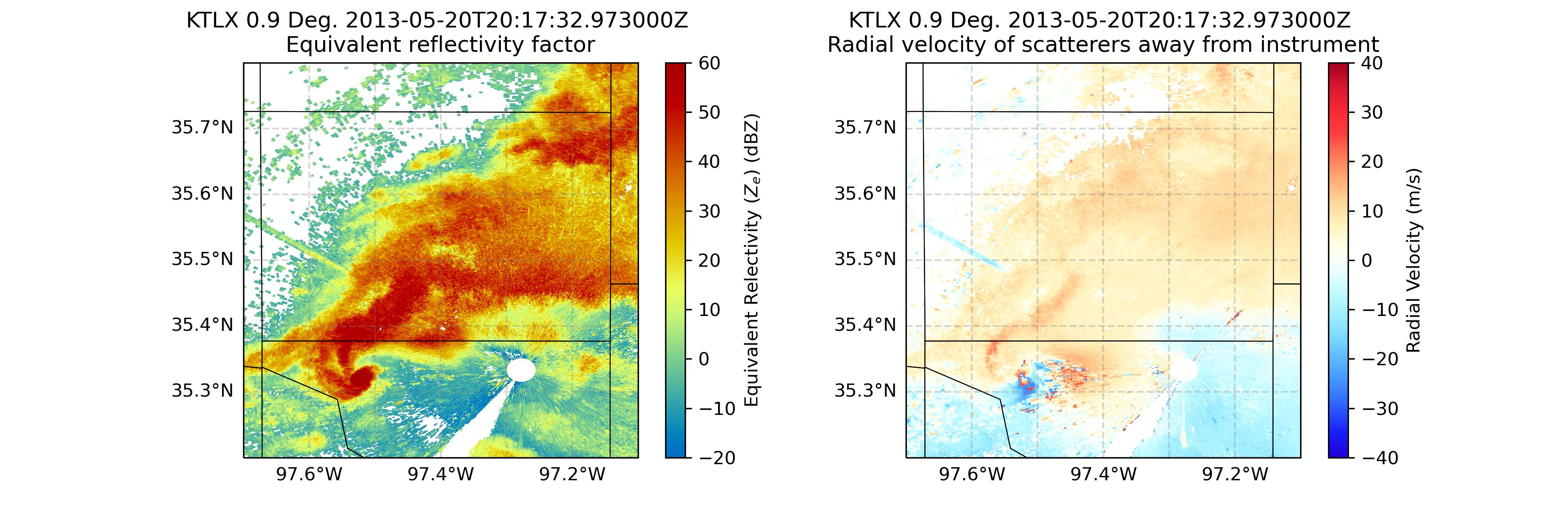
Let’s zoom in even more to our main feature - it looks like there is velocity couplet (where high positive and negative values of velcocity are close to one another, indicating rotation), near the center of our map.
# Create our figure
fig = plt.figure(figsize=[12, 4])

# Setup our first axis with reflectivity
ax1 = plt.subplot(121, projection=ccrs.PlateCarree())
display = pyart.graph.RadarMapDisplay(radar)
display.plot_ppi_map('reflectivity',
                     sweep=3,
                     vmin=-20,
                     vmax=60,
                     ax=ax1,)

# Zoom in by setting the xlim/ylim
plt.xlim(-98, -97)
plt.ylim(35, 36)

# Add counties
ax1.add_feature(USCOUNTIES,
                linewidth=0.5)

# Setup our second axis for velocity
ax2 = plt.subplot(122, projection=ccrs.PlateCarree())
display.plot_ppi_map('velocity',
                     sweep=3,
                     vmin=-40,
                     vmax=40,
                     projection=ccrs.PlateCarree(),
                     ax=ax2,)

# Zoom in by setting the xlim/ylim
plt.xlim(-98, -97)
plt.ylim(35, 36)

# Add counties
ax2.add_feature(USCOUNTIES,
                linewidth=0.5)

plt.show()
Customize our Labels and Add Finer Grid Labels
You’ll notice, by default, our colorbar label for the velocity field on the right extends across our entire figure, and the latitude/longitude labels on our axes are now gone. Let’s fix that!
# Create our figure
fig = plt.figure(figsize=[12, 4])

# Setup our first axis with reflectivity
ax1 = plt.subplot(121, projection=ccrs.PlateCarree())
display = pyart.graph.RadarMapDisplay(radar)
ref_map = display.plot_ppi_map('reflectivity',
                               sweep=3,
                               vmin=-20,
                               vmax=60,
                               ax=ax1,
                               colorbar_label='Equivalent Relectivity ($Z_{e}$) (dBZ)')


# Zoom in by setting the xlim/ylim
plt.xlim(-97.7, -97.1)
plt.ylim(35.2, 35.8)

# Add gridlines
gl = ax1.gridlines(crs=ccrs.PlateCarree(),
                  draw_labels=True,
                  linewidth=1,
                  color='gray',
                  alpha=0.3,
                  linestyle='--')

# Make sure labels are only plotted on the left and bottom
gl.xlabels_top = False
gl.ylabels_right = False

# Increase the fontsize of our gridline labels
gl.xlabel_style = {'fontsize':10}
gl.ylabel_style = {'fontsize':10}

# Add counties
ax1.add_feature(USCOUNTIES,
                linewidth=0.5)

# Setup our second axis for velocity
ax2 = plt.subplot(122, projection=ccrs.PlateCarree())
vel_plot = display.plot_ppi_map('velocity',
                                sweep=3,
                                vmin=-40,
                                vmax=40,
                                projection=ccrs.PlateCarree(),
                                ax=ax2,
                                colorbar_label='Radial Velocity (m/s)')

# Zoom in by setting the xlim/ylim
plt.xlim(-97.7, -97.1)
plt.ylim(35.2, 35.8)

# Add gridlines
gl = ax2.gridlines(crs=ccrs.PlateCarree(),
                   draw_labels=True,
                   linewidth=1,
                   color='gray',
                   alpha=0.3,
                   linestyle='--')

# Make sure labels are only plotted on the left and bottom
gl.xlabels_top = False
gl.ylabels_right = False

# Increase the fontsize of our gridline labels
gl.xlabel_style = {'fontsize':10}
gl.ylabel_style = {'fontsize':10}

# Add counties
ax2.add_feature(USCOUNTIES,
                linewidth=0.5)
plt.show()Summary
Within this example, we walked through how to use MetPy and PyART to read in NEXRAD Level 2 data from the Moore Oklahoma tornado in 2013, create some quick looks, and customize the plots to analyze the tornadic supercell closest to the radar.
What’s next?
Other examples will look at additional data sources and radar types, including data from the Department of Energy (DOE) Atmospheric Radiation Measurement (ARM) Facility, and work through more advanced workflows such as completing a dual-Doppler analysis.