
Comparison to Xarray
In this tutorial, you’ll learn about:
The differences and similarities between UXarray’s and Xarray’s plotting routines
Using
hvPlotwith Xarray
Related Documentation
Prerequisites
| Concepts | Importance | Notes |
|---|---|---|
| Xarray | Necessary |
Time to learn: 5 minutes
Introduction
For users coming from an Xarray background, much of UXarray’s design is familiar. This notebook showcases an example of transitioning a visualization of a structured grid using Xarray into a visualization of an unstructured grid using UXarray.
import cartopy.crs as ccrs
import matplotlib.pyplot as plt
import uxarray as ux
import xarray as xrData
We use two variations of the outCSne30 grid for this example. One of them is the original unstructured cube sphere, with the other being a remapped structured version.
Xarray
base_path = "../../meshfiles/"
ds_path = base_path + "outCSne30.structured.nc"
xrds = xr.open_dataset(ds_path)
xrds
Loading...
UXarray
base_path = "../../meshfiles/"
grid_filename = base_path + "outCSne30.grid.ug"
data_filename = base_path + "outCSne30.data.nc"

uxds = ux.open_dataset(grid_filename, data_filename)
uxds
Loading...
Visualization
Xarray
xrds["psi"].plot(figsize=(12, 5), cmap="inferno");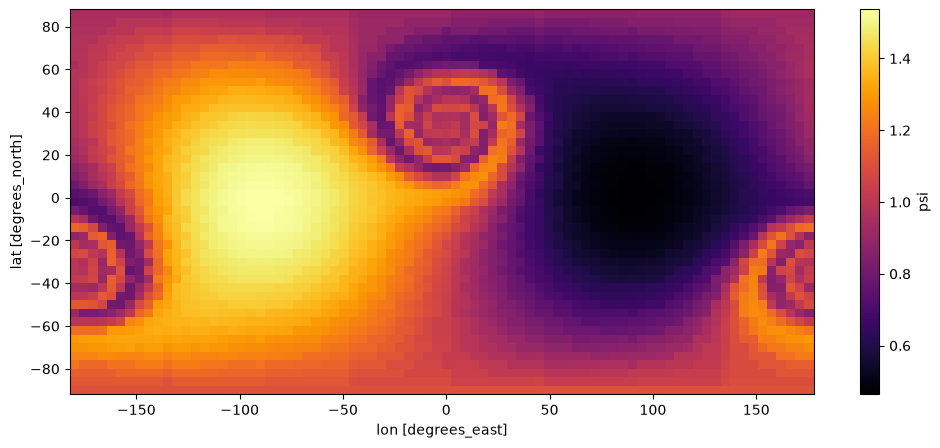
UXarray
uxds["psi"].plot(width=800, height=400, backend="matplotlib", cmap="inferno")Loading...
Loading...
Loading...
Loading...
Loading...
Loading...
Loading...
Loading...
Loading...
Loading...
Loading...
Using hvPlot to combine UXarray & Xarray Plots
Since UXarray is written using hvPlot, we can visualize Xarray and UXarray plots together by using hvplot.xarray.
See also:
To learn more about hvPlot and Xarray, please refer to the hvPlot Documentationimport holoviews as hv
import hvplot.xarray
hv.extension("bokeh")Loading...
Loading...
Loading...
Loading...
Loading...
Loading...
Loading...
(
    xrds.hvplot(cmap="inferno", title="Xarray with hvPlot", width=800, height=400)
    + uxds["psi"].plot(
        cmap="inferno",
        title="UXarray Plot",
        width=800,
        height=400,
        periodic_elements="split",
    )
).cols(1)
Loading...