 |  |



This “Pythia Cookbook” was started during the Project Pythia June 15-18 2026 in Boulder, CO at the NCAR Mesa Lab.
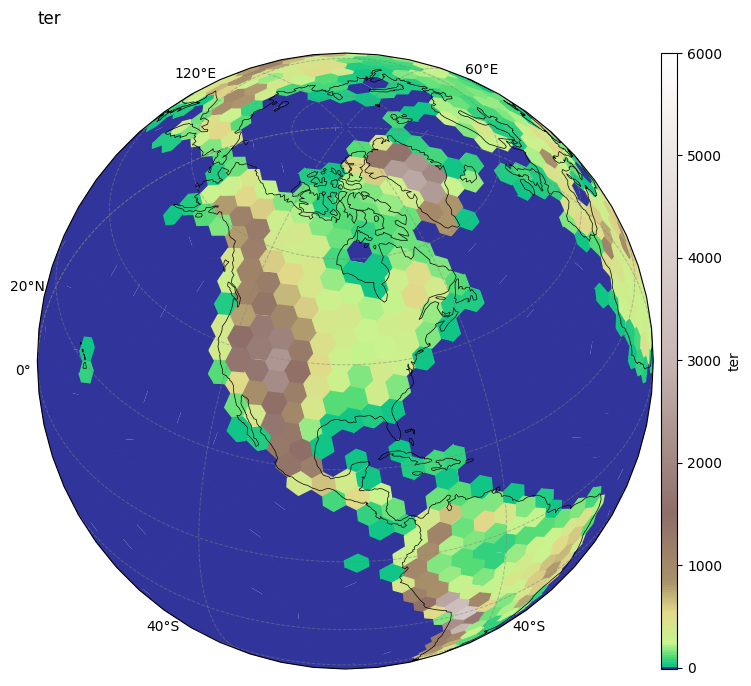
This MPAS-Viewer Cookbook aims to provide a comprehensive guide for utilizing MPAS-Viewer, a lightweight and efficient Python-based visualization tool designed specifically for MPAS data. Unlike common approaches that rely on triangulation or iterative polygon construction, MPAS-Viewer operates directly on the native mesh, treating each model cell as the fundamental plotting unit. This approach avoids computationally expensive preprocessing steps and significantly reduces rendering time.
Motivation
The development of this Pythia cookbook is motivated by the need to make MPAS-Viewer accessible, reproducible, and easy to adopt within the scientific community. By combining clear explanations with practical, executable examples, this cookbook provides users with a guided pathway to rapidly visualize, explore, and analyze MPAS-A outputs. It emphasizes simplicity, performance, and interactivity, enabling workflows that support animations, time exploration, and efficient data interrogation.
Authors
| Name | Affiliation |
|---|---|
| Jorge Bravo | Stevens Institute of Technology |
| Melissa Zavaleta | Florida Institute of Technology |
| Bella Condo | Texas A&M University |
| Ge Ming | MMM/NCAR |
| Agarwal Nathan | Johns Hopkins University |
Contributors

Structure
This practical development manual serves as an example of how to collect, manage, and present various MPAS-A data.
Foundations
The Model for Prediction Across Scales Atmosphere (MPAS-A) is an advanced atmospheric model designed to represent weather systems across both regional and global scales. Its defining feature is the use of an unstructured, variable-resolution mesh, often described as a honeycomb-like grid, which allows high resolution in regions of interest while maintaining coarser resolution elsewhere. This design enables MPAS-A to efficiently capture fine-scale phenomena such as convection and storms without sacrificing the ability to simulate large-scale atmospheric dynamics.
Despite these advantages, the unstructured nature of the MPAS mesh introduces challenges for data visualization and analysis. Although MPAS-A outputs are stored in NetCDF format, they cannot be treated like conventional gridded raster data. Proper handling of the data requires knowledge of the mesh connectivity, including vertices, edges, and cell centroids, which complicates otherwise straightforward visualization tasks. As a result, rapid inspection and exploratory analysis of MPAS-A outputs can become time-consuming and technically demanding.
Example workflows
Several notebooks with the following structure can be found in the notebooks directory:
Running the Notebooks
You can either run the notebooks in the Cookbook using Binder or on your local machine.
Running on Binder
The simplest way to interact with a Jupyter Notebook is through
Binder, which enables “one click”
execution in the cloud. Simply navigate your mouse to
the top right corner of the book chapter you are viewing and click
on the rocket ship icon (see screenshots here),
and a text box will appear. Type or paste the Pythia Binder link
(https://binder.projectpythia.org) and click “Launch”.
After a few moments you should be presented with a
notebook that you can interact with. You’ll be able to execute code
and even change the example programs. At first the code cells
have no output, until you execute them by pressing
Shift+Enter. Complete details on how to interact with
a live Jupyter notebook are described in the Pythia Foundations chapter Getting Started with
Jupyter.
Note, not all Cookbook chapters are executable. If you do not see the rocket ship icon, such as on this page, you are not viewing an executable book chapter.
Running on Your Own Machine
If you are interested in running this material locally on your computer, you will need to follow this workflow:
(Replace “mpasviewer-cookbook” with the title of your cookbooks)
Clone the
https://github.com/ProjectPythia/mpasviewer-cookbookrepository:git clone https://github.com/ProjectPythia/mpasviewer-cookbook.gitMove into the
mpasviewer-cookbookdirectorycd mpasviewer-cookbookCreate and activate your conda environment from the
environment.ymlfileconda env create -f environment.yml conda activate mpasviewer-cookbookMove into the
notebooksdirectory and start up Jupyterlabcd notebooks/ jupyter lab
- Bravo, J., Condo, B., Melissa, Z., Ge, M., & MPAS Viewer Cookbook contributors. (2026). MPAS Viewer Cookbook. Zenodo. 10.5281/ZENODO.20753191